

- 描述主体动作、镜头运动、场景与氛围。
- 镜头需要时,使用首帧或尾帧图像,并添加连续性约束。
- 声音属于视频内容时,描述音频。
FLUX 3 可以将文字简报、一张或两张建筑渲染图,或一段现有视频片段转化为带同步音频的视频。有效的提示词会明确主体与动作、镜头指令、场景与氛围、运动特征,以及相关情况下的连续性约束。声音重要时,也应描述音频。
建筑团队使用 RunDiffusion 上的 FLUX 3 制作项目影片、渲染图动画、日光变化、视频续接、解说和同步声音。这套工作流能够满足中大型建筑事务所的制作与审阅需求。
核心原则:为场景安排动作,而不是罗列物体。清楚描述发生什么、主体如何移动、镜头如何运动,以及整体氛围。每个镜头使用一个明确的取景术语、一种运动和一个主体动作。涉及多个镜头时,逐一说明并标注切换位置;只有需要在特定时刻准确发生时,才添加时间码。
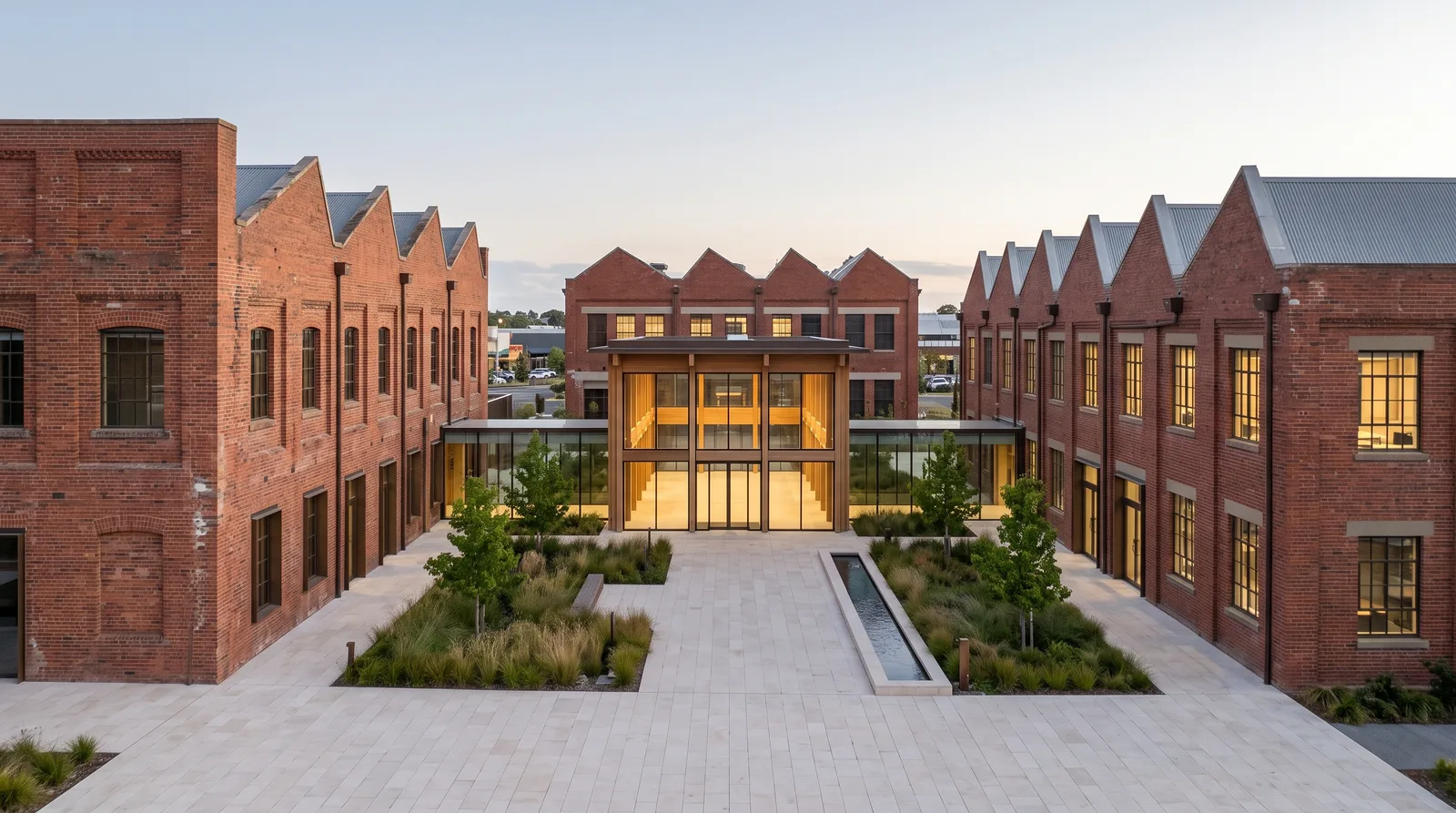
示例提示词使用英文。
提示词示例:
Wide shot of an adaptive-reuse headquarters courtyard in warm
evening light.

The camera slowly dollies forward along the central stone path
toward the illuminated glass-and-timber atrium. Ornamental grasses
move lightly and the reflecting pool ripples.

Light wind through the grasses and faint water movement.
镜头缓慢向前推进,穿过适应性再利用总部的庭院;场景中的运动仅限于景观植物和水面。
快速解答
可靠的 FLUX 3 视频提示词遵循以下顺序:
主体与动作 + 镜头指令 + 场景与氛围 + 运动特征 + 需要时的音频 + 相关情况下的连续性约束
简单镜头使用简单提示词即可:
Wide eye-level shot of a mass-timber workplace building at dawn.

Lobby lights turn on as reflections move across the glazing and
young trees shift in a light wind. The camera makes one slow
forward dolly across the empty arrival court.

Measured movement, warm early light, and deep focus.

Sound: wind in the trees, water in the linear drain, and airflow
through the lobby ceiling diffusers.
制作较长的多镜头建筑影片时,可使用六部分结构:核心概述、场景、主体描述、动态叙事、音频,以及风格与色彩。此结构并非必需;当画面风格和叙事需要贯穿多个镜头时,再采用它。
FLUX 3 概览
RunDiffusion 提供以下 FLUX 3 工具: Flux 3 Video、Flux 3 Extend Video、Flux 3 Draft Video和Flux 3 Draft Extend Video。
主要输入:文本提示词、一张首帧图像、一组首尾帧图像,或一段现有源视频片段。
核心方法:可见动作 + 清晰的镜头指令 + 可实现的时序 + 来自场景的音频 + 明确的连续性
提示词格式:简短提示词、自然语言单句、带标签的字段、时间戳提示词,或完整的多镜头简报
生成时长:大多数 Flux 3 工具最长支持 20 秒。
音频:可选的同步对白、环境声、物理音效和音乐
RunDiffusion 快速入门
- 登录RunDiffusion。

- 在左侧边栏中打开Boards。一个 Board 可以集中保存项目的源图像、提示词、生成结果和修订版本。

- 在 Boards 页面中,点击New Board。

- 选择From Scratch。

- 选择封面,输入清晰的 Board 标题,按需添加说明,然后点击Create。

- 在空白 Board 内,点击Add another Tool。

- 在 Choose Tool 中,保持选中Generation Kits并选择Video。

- 在 Video 中,保持选中Featured并选择
Flux 3 Video。

- 打开
Flux 3 Video工具并输入提示词。按需添加 Start Frame,选择视频分辨率和宽高比,检查 Advanced 选项,然后点击Run。如果工作流需要首尾帧过渡,则添加 End Frame。

1. 选择合适的 FLUX 3 工作流
对于建筑项目,先确定镜头应仅从文字开始、从一张已确认的起始渲染图开始,还是从两张相互兼容的端点渲染图生成。首帧图像确定起始构图。尾帧图像可与首帧图像搭配使用,确定结束构图。
文字生成视频
当您希望 FLUX 3 根据文字简报创建建筑场景,且无需匹配已确认的起始渲染图时,可以使用文字生成视频。
这种模式给予模型最大的发挥空间,适合早期概念影片、办公场所与园区研究、总体规划飞越镜头、立面动态构思、到达建筑的镜头序列,以及营造氛围的建筑补充镜头。
提示词应明确以下内容:
- 出现哪栋建筑、哪个室内空间、园区或街区
- 发生什么可见的动作或变化
- 镜头如何运动
- 场地、光线、天气、时段和氛围呈现何种状态
- 镜头的运动应具有什么特征
- 音频重要时,建筑环境中有哪些声音
- 涉及多个镜头时,各镜头从哪里开始、何处切换
从首帧图像生成视频
当视频必须从某个构图开始时,请使用一张已确认的建筑渲染图。Start Frame 图像定义准确的起始画面,提示词则描述场景如何向前发展。只提供一张图像时,它始终用作首帧。
不要用提示词的大部分篇幅重复描述图像中已经明确的内容。应着重说明:
- 从所提供画面开始发生的可见动作
- 一种明确的镜头运动
- 光线、水面、植物、门、屏幕或倒影的变化
- 节奏与运动特征
- 声音重要时,来自场景的音频
首尾帧生成视频
当建筑画面的起点与终点都很重要时,请同时使用首帧和尾帧图像。FLUX 3 会在两个给定构图之间生成运动。两帧应相互关联,即同一栋建筑或同一空间,并采用相互兼容的镜头设置;随后再描述它们之间的运动。
首尾图像的视觉差异越大,FLUX 3 自行构想过渡过程的空间就越大。结果可预测性重要时,请使用紧密相关的视图。
此工作流不能单独使用尾帧图像。要控制结束画面,必须同时提供首帧和尾帧图像。
根据建筑交付成果选择
根据团队已经确认的素材选择工作流。如果简单的输入结构已能提供项目所需的控制,就无需使用更复杂的结构。
- 当无需用源图像确定起始画面时,使用文字生成视频。
- 当所提供的渲染图应成为准确的起始画面时,使用一张首帧图像。
- 当起止画面都很重要时,使用首尾帧图像。
- 当源片段应不中断地继续展开时,使用视频续接。
简明的 FLUX 3 提示词公式
制作建筑视频时,使用以下已有说明的要素构建提示词:
- 主体与动作:指出建筑或空间,并描述发生什么。
- 镜头指令:选择取景方式和一种明确的运动。
- 场景与氛围:描述场地、照明、天气、时段和情绪。
- 运动特征:说明运动是缓慢、突然、精准、电影化,还是纪实风格。
- 连续性约束:仅在多镜头序列或续接需要时添加。
- 音频:仅在镜头需要时说明语音、环境声、音效或音乐。
建筑提示词模板
[Framing] of [building, interior, or district] at
[time, weather, and atmosphere].

[Subject or architectural element] [visible action].

The camera [one movement] while [supporting motion].

[Motion qualities, lighting, palette, and style].

Sound: [specific sources when audio matters].
完整的建筑提示词
Wide architectural exterior of an adaptive-reuse corporate
headquarters campus at early evening.

Lobby lights turn on gradually as daylight fades. Reflections move
across the atrium glazing and grasses shift in a light wind.

The camera tracks slowly across the empty arrival plaza.

Measured movement, realistic materials, natural contrast, and deep
focus.

Sound: light wind, distant traffic, courtyard water, and airflow
through the atrium ceiling diffusers.
这条提示词为什么有效
- 它明确了建筑主体与可见动作。
- 它采用一种明确的取景方式和镜头运动。
- 它描述了场景与氛围。
- 它赋予运动舒缓有度的特征。
- 它指出了场景中的具体声源。

简短、详细与结构化提示词
根据镜头所需的控制程度决定提示词长度。探索时使用简短提示词;只有在有助于提高控制时,才补充镜头、运动、氛围和音频。
用简短提示词探索
简短的建筑提示词将取景、次要环境运动、光照细节和声音选择留给模型决定。
Wide shot of a commercial office tower and empty forecourt at
golden hour. Slow dolly in as a light breeze moves the distant
trees.
简短提示词保留了一种明确的镜头运动和一种环境运动来源,同时将次要选择留给模型。
这种方法适用于:
- 早期建筑影片探索
- 一个明确的建筑与镜头构思
- 园区、立面、室内或总体规划的补充镜头
- 不同的展示方向
- 添加更多时序、音频或场景细节之前的初步测试
用更详细的提示词加强控制
当动作、镜头行为、节奏、音频或多个场景细节需要更精确的指导时,较长的自然语言描述会更有用。
Aerial wide shot approaching a large mass-timber workplace campus
at sunrise.

Morning light moves across the timber columns while trees shift in
a light wind and reflections change across the curtain wall.

The camera flies forward at a slow constant speed and descends
slightly above the landscaped arrival court.

Warm early light, realistic materials, restrained contrast, deep
focus, and measured motion.

Sound: light wind, distant city traffic, and water moving through
the arrival-court channel. No music.
较长提示词适用于:
- 特定的建筑运镜要求
- 多个协调的动作或环境变化
- 详细的场景、照明、天气与氛围
- 解说与建筑声音指导
- 需要更精细控制的多元素镜头
- 供客户审阅的项目影片和展示
更长并不一定更好。每句话都应明确一个可见的画面选择、一个声源、一个时序目标,或一条连续性规则。
用带标签的字段方便修改
当设计团队希望修改镜头、主体动作、运动、照明、色调、音频或风格,而不重写整条提示词时,带标签的字段会很有用。
Camera shot: Locked wide shot.

Subject + action: A commercial office tower rises above a
pale-stone podium as the distant tree canopy moves in a breeze.

Depth of field: Deep; the tower and landscape remain sharp.

Lighting + palette: Warm golden-hour light, bronze facade, pale
stone, and a soft blue sky.

Motion: Light movement in the distant tree canopy.

Style: Photoreal architectural film.

Audio: Breeze through the tree line and distant birds.
带标签的版本将取景、运动、照明、风格和音频分开,使项目团队每次可以只修改一个变量。
时序重要时使用时间戳
当立面变化、光照过渡、镜头揭示或切换必须发生在特定时刻时,时间戳提示词很有用。设置少量可实现的动作节点即可。
0.0–1.5s — Medium shot of a senior architect studying a
life-sciences campus model. A slow dolly in begins.

1.5–3.5s — He leans slightly toward the central glass connector and
studies it closely.

3.5–5.0s — He straightens and gives a small, satisfied nod as the
camera settles.

Audio: Only the brief rustle of his jacket as he leans forward and
one soft shift of tracing paper on the desk. No continuous ambience
and no music.

Style: Photoreal architecture campaign with soft natural light.
时间戳提示词在每个节点为建筑师安排一个明确动作,并将声音与可见运动联系起来。
对于短片,通常两到三个主要节点就足够了。如果每半秒就添加一条新指令,运动可能会显得仓促,或在视觉上混乱。
进阶多镜头提示词结构
当较长的建筑影片需要多个镜头、一致的主体描述、按时序发生的动作、协调的音频,或贯穿整段序列的统一视觉处理时,可使用完整结构。
建筑影片的六部分结构
- 核心概述:说明项目和序列的发展脉络。
- 场景:定义每个空间、光线、天气与景深。
- 主体描述:撰写一段固定的建筑项目描述。
- 动态叙事:描述每个镜头;时序重要时添加时间码。
- 音频:为每个镜头安排建筑声景。
- 风格与色彩:确定统一的整体展示风格。
对于建筑影片,使用主体描述确保不同镜头中的同一栋建筑或同一空间始终一致。同一主体再次出现时,保持这段措辞不变。
可复用的多镜头模板
Core summary:
[One sentence describing the complete sequence and its arc.]

Scene:
Shot 1: [setting, light, atmosphere, and depth of field].
Shot 2: [setting, light, atmosphere, and depth of field].

Subject description:
[One consistent description of the building or space.]

Dynamic narrative:
Shot 1 [0.0s-4.0s]: [camera move and visible action].
Shot 2 [4.0s-8.0s]: [cut, camera move, action, and pacing].

Audio:
Shot 1: [ambience, effects, speech, or music as needed].
Shot 2: [ambience, effects, speech, or music as needed].

Style & color:
[Realism, palette, contrast, grain, and global look].
多镜头建筑示例
Core summary:
A short architectural film presents a university engineering
complex from its main approach through the central atrium and up to
the rooftop research terrace.

Scene:
Shot 1: Early-morning exterior beside a planted arrival court.
Shot 2: Daylit central atrium with exposed steel bridges.
Shot 3: Rooftop terrace overlooking two laboratory wings.

Subject description:
A university engineering complex with two laboratory wings, a
transparent central atrium, exposed steel bridges, pale precast
facades, and deep aluminum sunshades.

Dynamic narrative:
Shot 1 [0.0s-4.0s]: A wide eye-level shot tracks slowly across the
empty arrival court while grasses move and reflections shift.
Shot 2 [4.0s-8.0s]: Hard cut inside. The camera glides beneath the
bridges as daylight moves across the terrazzo floor.
Shot 3 [8.0s-12.0s]: Hard cut to the roof. The camera rises slightly
to reveal both wings and the surrounding campus.

Audio:
Shot 1: wind in planting, distant traffic, and water at a drain.
Shot 2: low ventilation through the atrium ceiling diffusers.
Shot 3: rooftop wind and distant traffic below. No dialogue.

Style & color:
High-fidelity architectural film, realistic materials, natural
contrast, deep focus, measured movement, and neutral color.
有关建筑专用的运动方式,请参阅无人机飞越与环绕指南。
直接表达您的意图
建筑视频同样需要能安排到时间线上的动作。“活跃”“亲切”“高端”或“戏剧化”等抽象词语描述的是一种印象,而非产生这种印象的可见变化。
这样的描述很模糊:
The headquarters feels active, open, and welcoming.
这样的描述可以具体执行:
Lobby lights turn on across the ground floor while the entrance
doors slide open and reflections move over the stone paving.
The camera makes one slow push-in and stops on the atrium axis.
按播放顺序描述动作
顺序重要时,使用表示先后关系的连接词:
- 首先
- 随着
- 然后
- 之后
- 同时
- 最后
与多条互不相关的指令相比,一条连续的动作链通常更容易生成。
FLUX 3 镜头指令
镜头语言应帮助清楚呈现建筑和空间序列,而不是与它们争夺注意力。先使用一种取景术语、一种运动,以及一种容易辨识的建筑或环境变化。
取景
- 大特写:突出材料接缝或微小细节
- 特写:展示立面构件、装置或材料表面
- 中全景:呈现入口、房间或结构开间
- 近似立面图的镜头:以受控透视呈现立面
- 全景:展示建筑及其紧邻的场地环境
- 建立镜头:呈现完整项目和周围环境的尺度
角度
- 平视:呈现行人视角的到达过程与通行路线
- 仰拍:强调高度、结构和立面进深
- 俯拍:展示场地规划、屋顶和通行路线
- 垂直俯视:呈现庭院、街区与总体规划之间的关系
- 贴地视角:强调铺地、排水、种植和立面底部
- 主观视角:让观众置身于穿行空间的真实路径中
运动
- 推进:摄影机靠近主体
- 拉远:摄影机远离主体
- 水平摇摄:摄影机在固定位置水平转动
- 垂直摇摄:摄影机在固定位置上下转动
- 跟拍:摄影机跟随移动的主体
- 横移:摄影机向侧面移动
- 升降:摄影机垂直移动
- 弧线或环绕运动:摄影机绕主体移动
- 摇臂运动:摄影机在空间中升起或下降
- 手持跟拍:受控的人体移动,带有轻微不稳定感
- 静止或固定镜头:摄影机不移动
对焦
- 大景深:前景和背景都清晰可辨
- 浅景深:主体清晰,背景柔和虚化
- 焦点转换:焦点在两个明确的主体之间移动
- 微距对焦:突出极小的表面细节
每个镜头只保留一个主要运镜构思
这样的描述很清晰:
Eye-level tracking shot moving parallel to the precast facade
at a steady pace.
这样的描述过于繁杂:
Low aerial handheld orbit around the tower with a fast push-in,
whip pan, rack focus, sudden zoom, and rolling horizon.
如果需要新的镜头方向,就使用新镜头,并明确说明切换。不要要求同一个连续镜头同时处于静止、手持、航拍和环绕状态。
建筑构图与透视
建筑镜头指令应说明空间秩序和尺度。使用有助于审阅目标的构图语言。
- 对于入口、中庭、走廊和正式的室内镜头序列,使用轴线构图或一点透视。
- 当需要通过视差呈现立面进深、结构节奏或景观层次时,使用带有稳定前景的横向移动。
- 当需要准确呈现建筑时,要求垂直线保持竖直,地平线保持水平。
- 对于完整建筑、总体规划和空间关系,使用大景深。
- 将浅景深留给材料细节,或有意从前景揭示到背景的画面。
避免不必要畸变的镜头指导
镜头语言用于传达空间意图。提供 Start Frame 时,图像已经确定了起始构图;只有在需要改变预期的镜头行为时,才添加镜头焦段方面的描述。
- 需要同时保留建筑及其紧邻场地时,使用经过畸变校正的广角建筑视图。
- 在办公场所、中庭、实验室和立面研究中,使用正常透视呈现客观的比例。
- 需要让远处建筑层次相互对齐,或将塔楼与其周边环境关联起来时,使用具有压缩感的视图或长焦视图。
- 除非鱼眼或超广角畸变是构思中有意采用的效果,否则应避免使用。
建筑空间之间的转场
不要强行让一个连续镜头穿过彼此不连通的空间。选择符合实际空间关系的转场。
- 摄影机切换楼层、建筑或不相关视点时,使用硬切。
- 当入口轴线、结构网格、屋顶轮廓或材料细节在不同镜头间相互对应时,使用匹配剪辑。
- 只有当摄影机穿行建筑的路线在物理上可实现时,才使用一个连续镜头。
- 当每个空间都需要各自已确认的渲染图或镜头设置时,分别生成片段。
根据交付成果选择宽高比
撰写最终镜头指令前,先在 RunDiffusion 中选择宽高比。根据最终展示位置构图,而不是依赖后期裁切。
- 项目影片、演示、网站,以及宽阔的场地或室内视图,使用 16:9。
- 竖屏项目推广、塔楼研究,以及在狭窄画幅中仍清晰可辨的细节,使用 9:16。
- 为竖屏输出重新安排镜头,而不是裁切宽幅的总体规划或园区构图。
- 在整个运动过程中,让重要的入口、塔楼顶部、标识和环境背景始终保留在最终画幅内。
对白、环境声、音效与音乐的提示词
FLUX 3 可以随视频生成同步音频。对于建筑场景,应明确声源:景观植物间的风声、排水口的水声、门机声、通风格栅处的气流声,以及经过的车辆声。镜头需要时,再单独添加克制的解说。
以下四类音频便于分别指导:
- 语音:谁在说话、准确台词,以及表达方式。
- 环境声:环境中持续存在的声音。
- 音效:由可见动作产生的声音。
- 音乐:风格、节奏,以及在混音中的位置。
不必四类都用。仅保留有助于镜头的声音层次。
音频提示词模板
Dialogue or voiceover:
[Speaker] says, "[exact words]." [Concrete delivery direction].

Ambience:
[Specific environmental sources].

Effects:
[Sounds connected to visible actions].

Music:
[Style, tempo, instrumentation, and role in the mix].
明确说话者
如果引号内的台词没有指定可见的说话者或画外音指令,就可能被误解为应显示在画面中的文字。
对于出镜说话者:
A project architect stands beside the campus model and says,
"The atrium connects the existing buildings into one workplace."

Calm, conversational voice, speaking to one client across the table.
No other people are visible.
对于解说:
Voiceover: "The new structure follows the industrial grid."

Close, dry recording, measured pace, no announcer delivery.
No on-screen text or subtitles.
写出适合说出口的对白
- 如果人物自然说话时会使用简略的口语说法,台词中也照此书写。
- 删去观众已经能从画面中看出的铺垫。
- 标点保持简单。
- 让人物有说话的理由。
- 在台词前后留出呼吸和反应的时间。
- 如果最后一个词被截断,就缩短台词。
建筑画外音示例
Wide locked shot inside a completed mass-timber office atrium.

Sunlight moves across the timber columns while reflections shift on
the polished floor. No people are visible.

Voiceover: "The central atrium brings daylight into every level."

Calm project narration, close dry recording, measured pace, no
announcer delivery, and no on-screen text or subtitles.

Ambience: airflow through ceiling diffusers and faint traffic
filtered through the glazing. No music.
让声音与画面对应
具体声源比宽泛的氛围词更有效。
不要只写:
Moody ambience and cinematic sound effects.
可以写:
Rain ticks against the steel entrance canopy. Water moves through
the slot drain, automatic doors open once, and ventilation hums
inside the lobby. Distant traffic remains low in the background.
No music.
办公场所首帧示例:
Wide shot of a mass-timber workplace atrium.

The camera slowly dollies forward as a single employee carrying a
portfolio walks toward the revolving door. She pauses and looks up
at the exposed timber structure as the camera settles.

Audio: Only short, distinct heel clicks on the stone floor, each
followed by a brief natural echo that fully decays. No continuous
ambience and no music.
一个从首帧开始的办公场所镜头,仅使用离散、可见动作对应的声源,而没有持续的环境声层。
多语言项目解说
制作多语言项目解说时,在每句台词旁注明语言。根据项目需求,使用该语言的原生文字、罗马字转写,或通俗的语义说明。保持各段简短,并在确认前检查发音、说话者归属、时序和含义。
项目片段之间的声音一致性
在相关片段中复用完整的声音指导:说话者描述、语言、语体、必要时的口音、录音设置、表达方式,以及不使用播音腔的限制。重复这些指导有助于提高连续性,但不能保证每次生成都由同一个声音演绎。将片段组合成项目影片前,应逐段检查。
图像生成视频的提示词
一张或两张干净的建筑渲染图可以定义起始和结束画面。上传前,移除审阅标记或不需要的标签。提供一张图像时,提示词引导场景从准确的起始画面开始运动;提供两张图像时,提示词描述两个给定端点之间的运动。
建筑源图像预检查
撰写提示词前,先准备首帧图像;如有需要,也准备与其兼容的尾帧图像。干净且已确认的渲染图能为 FLUX 3 提供明确的建筑端点,并使审阅时更容易发现设计偏移。
- 两张端点图像使用同一个设计版本。
- 移除审阅批注、选择框、光标、临时尺寸标注和不需要的文字。
- 使用干净的图像,并保留足够的可见细节以供审阅。
- 首尾图像应对应同一栋建筑或同一空间,并采用相互兼容的镜头设置。
- 选择能让 FLUX 3 在端点之间形成合理路径的过渡方式。
- 确认事务所有权使用每张渲染图、图像、标志及其他源素材。

首帧提示词模板
[Subject or architectural element] [visible action].

The camera [one movement] while [supporting motion].

[Scene, atmosphere, and motion qualities].

Sound: [specific sources when audio matters].
建筑首帧示例
From the supplied exterior Start Frame, the camera trucks slowly
from left to right along the empty arrival court.

Roof monitors catch changing morning light, grasses move in a light
crosswind, and water drains from the canopy after rain.

Measured architectural film, realistic materials, and deep focus.

Sound: light wind, water at the drains, distant roadway noise, and
ventilation from rooftop equipment. No dialogue or music.
首尾帧提示词模板
[Opening scene] transitions into [ending scene].

[Visible change] while the camera [one continuous movement].

[Motion qualities, atmosphere, and pacing].

Sound: [specific sources when audio matters].
建筑首尾帧示例
The supplied morning view of the regional rail terminal transitions
into the supplied evening view.

The camera makes one slow forward dolly along the empty arrival
axis. Daylight softens, canopy lights turn on gradually, and
reflections deepen across the glazing and wet paving.

Sound: light wind, distant rail movement, water at the drains, and
an electrical hum from the canopy lights. No dialogue or music.
首尾帧过渡:从所提供的清晨渲染图过渡到所提供的傍晚渲染图。
视频续接
建筑视频的续接应从最后的镜头运动延续,而不是重新描述项目。撰写提示词前,先观看源片段的最后几秒。
明确以下内容:
- 结束画面中可见的建筑、空间和场地
- 摄影机当前的高度、方向和速度
- 最后出现的环境或建筑变化
- 场景中的光线、天气、倒影和材质表现
- 正在发出的建筑环境声和音效
- 镜头路径接下来在物理上可实现的一段
适应性再利用总部片段的无声续接,从源视频的最后一帧开始,延续原有镜头路径。
续接模板
Continue without a cut.

The existing [camera movement] continues along [path] as
[the next visible action unfolds].

[Scene, atmosphere, and motion qualities].

Continue [existing sound] and add [sound from the new action].
建筑视频续接示例
Continue without a cut from the airport terminal source clip.

The existing slow dolly continues along the empty departure
concourse. Daylight spreads across the floor, exterior service
lights fade, and the camera passes beneath the next structural bay.

Continue the airflow through ceiling diffusers and the distant
airfield rumble.
实用 FLUX 3 建筑提示词示例
会展中心入口
Wide eye-level shot of a regional convention and exhibition center
at first light.

Water drains from the canopy after overnight rain, flags move
lightly, and reflections shift across the glazing.

The camera tracks slowly beneath the deep entrance canopy across an
empty arrival plaza.

Realistic architectural film, cool morning light, straight
verticals, deep focus, natural materials, and restrained contrast.

Sound: water at the drains, light wind, distant roadway noise, and
low interior ventilation. No dialogue or music.
根据“会展中心入口”提示词,通过文字生成视频得到的建筑入口镜头。
竖屏综合体塔楼研究
Vertical 9:16 architectural film of a high-rise residential tower
and substantial mixed-use podium at blue hour.

Interior lights turn on in an irregular pattern while reflections
deepen across the curtain wall.

The camera rises slowly from the landscaped arrival canopy toward
the tower crown.

Natural blue-hour exposure, realistic glazing, warm interior light,
deep focus, and restrained architectural visualization.

Sound: light wind, distant traffic, and airflow at the podium
ventilation louvers. No dialogue or music.
临床研究楼中庭
Wide locked-off shot inside the main atrium of a clinical research
building before opening.

Motorized blinds rise gradually as morning light crosses the
terrazzo floor. Reflections change on the glazed bridges and the
automatic entrance doors open once, then close.

Realistic institutional architecture, neutral daylight, straight
verticals, deep focus, and natural material color.

Sound: airflow through ceiling diffusers, one door cycle, and
distant elevator machinery. No dialogue or music.
可调节立面日光研究
Locked medium-wide exterior of a mid-rise office building's south
facade at midday.

Perforated aluminum sunshades rotate gradually across several
structural bays as sunlight moves over the precast frame. Shadows
move across the glazing while the camera remains static.

Realistic daylight study, neutral exposure, straight verticals,
deep focus, and accurate material response.

Sound: light wind, distant traffic, and quiet shade motors during
rotation. No dialogue or music.
城市总体规划飞越
Aerial wide shot approaching a completed mixed-use urban district
at early morning.

The camera follows one slow descending arc at a constant speed,
revealing the public space and transit station.

Realistic planning visualization, natural daylight, deep focus,
restrained color, and credible construction detail.

Sound: high wind, distant city traffic, and train movement at the
station. No dialogue or music.
多镜头生命科学园区影片
Core summary:
A project film presents a large life-sciences campus from the
arrival court through its shared atrium and laboratory wing.

Scene:
Shot 1: Early-morning exterior at the campus arrival court.
Shot 2: Daylit shared atrium between the laboratory buildings.
Shot 3: Laboratory-wing exterior beside a planted service court.

Subject description:
A life-sciences campus with pale precast frames, recessed glazing,
vertical aluminum sunshades, and a transparent central atrium.

Dynamic narrative:
Shot 1 [0.0s-4.0s]: Wide tracking shot across the empty arrival
court as trees move and reflections shift across the glazing.
Shot 2 [4.0s-8.0s]: Hard cut inside. Slow forward glide beneath the
bridges as daylight moves across the terrazzo floor.
Shot 3 [8.0s-12.0s]: Hard cut outside. A slow lateral truck reveals
the laboratory wing and planted service court.

Audio:
Shot 1: wind in planting, distant traffic, and water at a drain.
Shot 2: airflow through the atrium ceiling diffusers.
Shot 3: light wind and distant mechanical equipment. No dialogue.

Style & color:
High-fidelity architectural film, realistic materials, natural
contrast, straight verticals, deep focus, and measured movement.
FLUX 3 提示词常见问题
片段显得仓促
可能原因:短时间内安排了过多动作、切换或台词。
解决方法:将片段精简为一个主要动作、一个反应、一条镜头路径和一句简短台词。如果动作需要更多时间,就延长时长,或拆分成独立片段。
镜头运动不稳定
可能原因:提示词组合了多种互不兼容的运镜术语。
解决方法:每个镜头选择一种主要运动。将第二个运镜构思放到切换后的新镜头中,并清楚命名。
建筑在镜头之间发生变化
可能原因:主体描述随镜头变化,或每次都用不同方式描述同一栋建筑。
解决方法:使用同一段主体描述;每当同一栋建筑或同一空间再次出现时,原样重复。
起始图像立即发生偏移
检查:确认图像已添加为 Start Frame。
提示词:描述动作与运动。所提供的图像已经定义了起始画面。
首尾帧过渡发生扭曲
可能原因:端点图像差异过大,或两者之间的运动不明确。
解决方法:使用相互关联的端点图像,并描述它们之间可见的过渡过程。
对白变成了画面文字
可能原因:引号内的台词没有指定可见的说话者或画外音。
解决方法:明确谁在说话。对于解说,在准确的引述台词前写明“画外音:”。需要明确区分时,补充“画面中没有文字或字幕”。
最后一个词被截断
可能原因:对白占用了片段中过多的可用时间。
解决方法:缩短台词,要求提前说完,或增加时长。为台词的开始和说话者的反应留出时间。
声景显得泛泛
可能原因:提示词只使用氛围标签,没有明确声源。
解决方法:明确建筑声源,例如雨棚上的雨声、排水口的水声、天花板散流器中的气流声、门机声、电梯机械声、远处交通声,或景观植物间的风声。
语音含混不清
可能原因:多个声音、人群对白、音乐和物理音效挤在同一混音中。
解决方法:只保留一位主要说话者,缩短台词,移除背景人声,并在对白下方使用非语言环境声。
视频续接像是一个新片段
可能原因:提示词重新开启了场景,或与源片段最后的运动相矛盾。
解决方法:描述现有镜头如何不切换地继续展开。源片段已经提供了运动、主体和视觉风格。
在 RunDiffusion 上继续学习
- 探索RunDiffusion 提示词中心。
- 浏览AI 视频生成指南。
- 使用视频制作模板组织规模更大的项目。
- 学习建筑飞越与环绕的实用运动方式。
常见问题
FLUX 3 提示词的最佳结构是什么?
先说明主体与动作,再添加镜头指令、场景与氛围、运动特征,以及需要时的音频。只有镜头需要更精细的控制时,才使用带标签的字段或时间戳。
FLUX 3 提示词需要很长吗?
不需要。简短提示词适合探索,因为它将更多取景、运动、情绪和声音的选择留给模型。只有当增加文字能更精确地说明动作、镜头路径、声源、连续性要求或结尾时,才延长提示词。
FLUX 3 能在生成视频的同时生成声音吗?
可以。FLUX 3 可按需生成同步语音、环境声、物理音效和音乐。将声音作为场景的一部分进行描述,并让音效与可见动作相对应。
应该如何撰写 FLUX 3 项目解说?
将准确台词放在引号内,并将画外解说标明为画外音。明确说话者、语言、录音设置和表达方式。让文案足够简短,以保持自然节奏,并检查各项目片段之间的声音连续性。
FLUX 3 可以生成多个镜头吗?
可以。为每个镜头命名,说明其空间、动作和运镜。只有切换或动作必须在特定时刻发生时,才添加时间戳。镜头数量应符合时长限制,并通过统一的主体描述和视觉处理保持连续性。
FLUX 3 可以将图像仅用作宽泛的视觉参考吗?
不可以。提供给我们当前 Flux 3 Video 工作流的图像会成为视频中的画面。一张图像定义起始画面,两张图像分别定义起始和结束画面。它们不会仅被视作宽泛的视觉灵感。
FLUX 3 可以使用首帧和尾帧吗?
可以。同时添加 Start Frame 图像和 End Frame 图像。FLUX 3 会生成两者之间的运动。让端点相互关联,并描述可见的过渡过程。
我可以只使用尾帧吗?
不可以。只提供一张图像时,它会用作首帧。要控制结束画面,必须同时提供首帧和尾帧图像。
如何续接现有的 FLUX 3 片段?
使用视频续接工作流。源片段提供运动、主体和视觉风格;您需要描述镜头如何不切换地继续展开。
应该使用多少条镜头指令?
每个镜头使用一个主要取景概念和一种主要运动。只有第二种镜头行为与其兼容,或属于一次明确切换后的新镜头时,才添加第二种镜头行为。
为什么我的 FLUX 3 视频没有遵循完整提示词?
提示词可能包含过多动作、互相冲突的镜头指令、不可能实现的时序,或彼此干扰的音频层。先精简为一个核心事件,再逐个变量地补回细节。
选择模型,开始生成
这些模型针对细节进行了优化,打开一个模型,将本指南付诸实践。


